Tracking your key accounting metrics from Tally ERP is more important to run your business. Waiting on multiple financial reports is a headache; TallyGraphs Accounting Dashboard aggregates all your accounting and finance metrics in one place. We get a quick analysis of Sales, Payments, Expenses, and much more.
The idea behind the TallyGraphs is to keep business owners, CEO, CFO, and accountants aware of what is happening in the business at all times.
Growth Metrics
Growth cards indicates important highlights inside the Accounting Dashboard.

- Total Sales The total income that the customer generated from all sales.
- Total Purchase The sum of all payments made by the customer for goods and services.
- Total Expenses The total amount of money that is spent for business during a particular period of time.
- Total Receipt The total amount of money that is received by a business during a particular period of time.
- On-time Receipt The total number of receipts paid on-time amount of funds in a customer’s account at the beginning of a new financial period.
- Late Receipt which represent the total number of receipt (credit) with late paid.
- On-time Paid which represent the total number of payment (debit) was made without delay.
- Late paid which represent the total number of payment (debit) was made with late.
Sales, Expenses, and Receipts in last 12 Months
Analyze the growth of your sales against Expenses and Receipts. Get an interactive view of your company’s monthly performance.

Receipts and Payments
Receipts aggregates the customer’s received amount from the sales for a particular period of time, also indicate whether the credit was made on time or late. Through the ledger group filter, you can customized your data by ledger group wise.
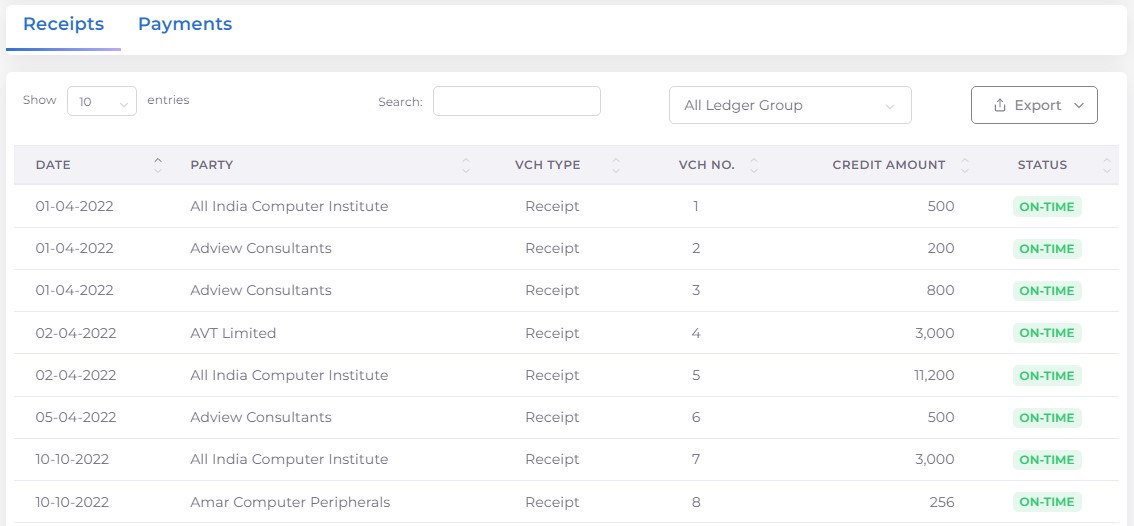
Payments aggregates the customer’s paid amount for the purpose of purchase for a particular period of time, also indicate whether the debit was made on time or late. Through the ledger group filter, you can customized your data by ledger group wise.

Filter Options
Following filter options are available in Accounting Dashboard. Using these filters you can filter the data as per your needs.

All month filter Using this filter you can track your transaction information according to your needs month by month.
Date range filter The following options are available in range filters.
- All Years
- Current Financial Year
- Current Calendar Year
- Current Quarter
- This Month
- Previous Financial Year
- Previous Calendar Year
- Previous Quarter
- Previous Month